







Quick Help
Interface Description
Toolbar

Reset All - Resets the existing project
Load Project - Opens projects created by Java script Obfuscator
Save Project - Saves a current project
Add File - Opens .js or .efs files.
Delete File - Deletes .js or .efs files from the List of the files.
Start processing - Processes all files from List of files, saves a result and creates bak files
Restore source files - Restores a previous copy of files from .bak's
List of Files

Shows files to be processed.
• Use the right click for context menu (add/delete files or open a selected file in Notepad)
• You can use drug-n-drop to add files to the list
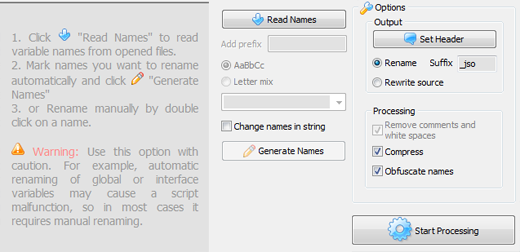
Statistics, Options
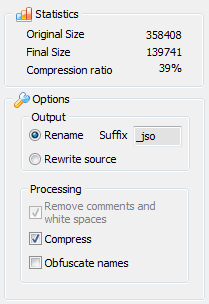
Set Header - Adds a header comment to processed file.
Rename - If selected, new output files will be created with a defined suffix.
Rewrite source - If selected, source files will be rewitten by output files. Backup files with .bak extension will be created as well.
Compress - If checked, source code will be compressed.
Obfuscate names - If checked, variables will be renamed depending on "Names" list settings.
Rename Panel
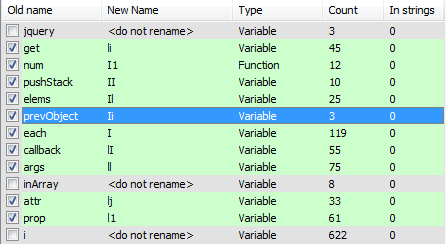
Allows you to manage a changing of variable and function names the Java script Obfuscator has found in project's files.
If Obfuscate names - checkbox is set the Java script Obfuscator will rename variables and functions depending on "Names" list settings.
To rename in Manually - mode you should double click on a necessary name and type a new one.
To rename in Auto - mode you at first should mark the names in the Rename Panel. Use the right-click context menu for it.
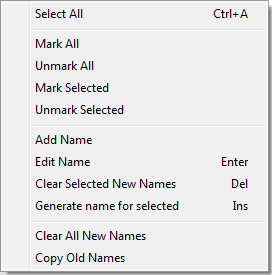
After the necessary names are marked you can generate new names. You can add prefix, use letters or letter mix.
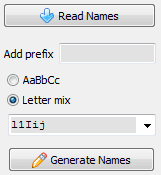
Read Names - Reads variable names from opened files.
Add prefix - Prefix will be used at the beginning of the generated name.
AaBbCc - All alphabet will be used for generated names, starting with "A" for name with max Count.
Letter mix - Chars from this charset will be used for generated names only. You can type your own set or select a pre-defined one.
Change names in string - If checked, variable names found in strings will be changed. Use with caution. Not fit for short or common names.
Generate Names - Generates new names for selected variables.
Command line support
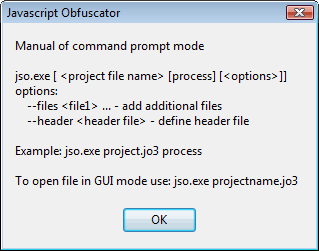
jso.exe myproject.jo3 - opens myproject.jo3
jso.exe myproject.jo3 process - runs myproject.jsp and processes files depending on myproject.jo3 settings. Log is in myproject.log.
jso.exe myproject.jo3 process --files gallery.js gallery.dun.js items.js - runs myproject.jsp, adds gallery.js gallery.dun.js items.js files and processes files depending on myproject.jo3 settings. Log is in myproject.log.
jso.exe myproject.jo3 process --header headerfile.txt - runs myproject.jsp, defines header file and processes files depending on myproject.jo3 settings. Log is in myproject.log.
Next page Video Tutorial
Download Free Trial Now! (1Mb) Buy Now!
Navigation
- Javascript Obfuscator
- What's New
- Quick Help
- Video Tutorial
- Interface Description
- Open files
- Rename Panel
- Obfuscate Names
- Compress Javascript Code Options
- Rename in Auto Mode
- Process and save files
- Restore from *.bak
- Save Project
- Purchase Full Version
- Download Free Trial
- Contact Javascript-Source.com
- Feedback
Feedback
- "..I've been looking for a flexible obfuscator and I downloaded version of your javascript encrypt tool.."
- "..Javascript Obfuscator greatly compresses size and improves download time of the protect javascript files.."