







Quick Help
Process and Save Compress Javascript Files
If you've created new names for all the required names and set all the options you can start process of obfuscating the data.
To do it you should click "Start Processing" button on the Toolbar or on the right panel or select "Project / Start Processing" in the Main menu.

You can also view the statistic.
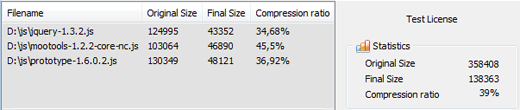
After the obfuscating of your .js files you can view these files in Notepad.
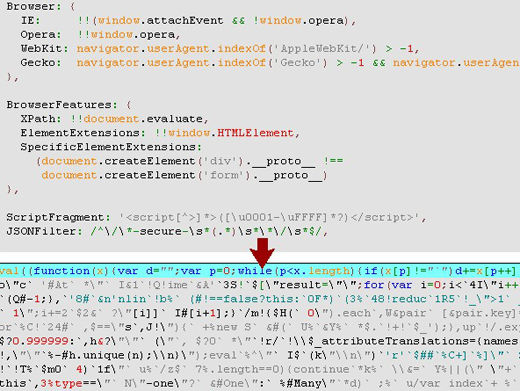
To do it you should select "Services/View Source in Notepad" in the Main menu.
Compare how the same piece of code looks before and after processing by Javascript Obfuscator.
Next page
Download Free Trial Now! (1Mb) Buy Now!
Navigation
- Javascript Obfuscator
- What's New
- Quick Help
- Video Tutorial
- Interface Description
- Open files
- Rename Panel
- Obfuscate Names
- Compress Javascript Code Options
- Rename in Auto Mode
- Process and save files
- Restore from *.bak
- Save Project
- Purchase Full Version
- Download Free Trial
- Contact Javascript-Source.com
- Feedback
Feedback
- "..I've been looking for a flexible obfuscator and I downloaded version of your javascript encrypt tool.."
- "..Javascript Obfuscator greatly compresses size and improves download time of the protect javascript files.."